Project Structure and Build System
Gundolf Kiefer, 2025
Overview
PicoNut is a multifaceted project that includes a configurable CPU design, various peripheral hardware modules, and RISC-V software components. All these components are designed to be portable. For instance, the hardware synthesis process supports multiple FPGA or ASIC toolchains, and the software stack is compatible with multiple operating systems and environments, accommodating diverse hardware configurations and RISC-V extensions.
To manage the complexity and ensure the codebase remains maintainable and extensible, clear directory structures and a layered organization of all hardware and software modules are crucial. Compilation and synthesis tasks are abstracted to provide flexibility with respect to the target technologies and toolchains.
The PicoNut build system, built on GNU make, offers the following capabilities:
Creating hardware simulators
Performing hardware synthesis
Compiling (RISC-V) software for customized hardware
Supporting alternative synthesis toolchains
Facilitating internal builds and externally built systems through a build context
Installing hardware and software artifacts on the development machine and utilizing existing installations
Enabling automated verification/testing and CI/CD pipelines through a dedicated
verifytargetProviding integrated documentation (
helptarget) and lightweight issue tracking (howdytarget)Supporting highly parallel operations, driven by dependencies, for rapid build cycles
Allowing modular builds for efficient compilation and synthesis
This chapter outlines the overall project organization and serves as a user guide for the PicoNut build system, which is closely integrated with the project structure.
General Concepts
Modules
The PicoNut project is divided into modules. A module is a unit with its own Makefile that can be built by itself.
A module may be internal as part of the PicoNut repository or external as part of a user project which uses PicoNut. External modules are not part of the PicoNut project.
Each module is identified by a unique identifier, which is available as a variable PN_MODULE_ID in any PicoNut Makfile. For internal modules, the ID is equal to the relative path inside the PicoNut source tree (PN_SOURCE_DIR). For external modules, the ID may be provided by the user or be set automatically to the absolute path inside the user’s file system (without a leading “/”).
The term module name (variable PN_MODULE_NAME) reflects the last component of the module ID, which is also the exact name of the containing directory.
Modules may have submodules. These are modules with their own Makefile. Submodules may be subcomponents (e.g. the ALU of a CPU), alternatives (e.g. Nucleus variants as submodules as in hw/cpu/nucleus or hw/cpu/membrana ) or have any other meaning at the responsibilty of the base module developer. In any case, submodules are reflected by sudirectories of the base module’s directory with the same name as the respective submodule.
Subdirectories can also be freely used at the responsibilty of the module developer. It is not required that subdirectories represent submodules.
Target Technologies (TECHS)
Hardware modules may be built for simulation or for synthesis for a certain FPGA or ASIC technology. These different general targets are referred to as target technologies or - shortened - techs (build argument TECHS). Presently, the following techs are defined:
sim: Simulationsyn: Synthesis for various physical (FPGA) technologies
In the future, more techs may be added.
Build Context
The build system may be used for very different use cases:
developing systems using PicoNut
developing PicoNut components as a PicoNut developer
developing on the PicoNut infrastructure as a PicoNut core developer
Systems may have custom configurations. PicoNut developers typically work inside the PicoNut source tree. System developers may not.
The build context refers to the system currently built for, or it may be global, if no system is defined.
The build system provides a separation of build contexts by means context-specific module build directories (PN_MODULE_BUILD_DIR).
Also, the behaviour of some targets may depend on the context in order to facilitate the typical use cases. For example, for systems, the default installation target (PREFIX) is set to the system’s piconut directory to have all outputs immediately available for the system.
Layers and Dependencies
To keep the growing ecosystem around the PicoNut project maintainable, strict modularity with clearly-defined dependencies between modules must be maintained. Therfore, the PicoNut ecosystem is divided into layers, and each module is assigned to a specific layer.
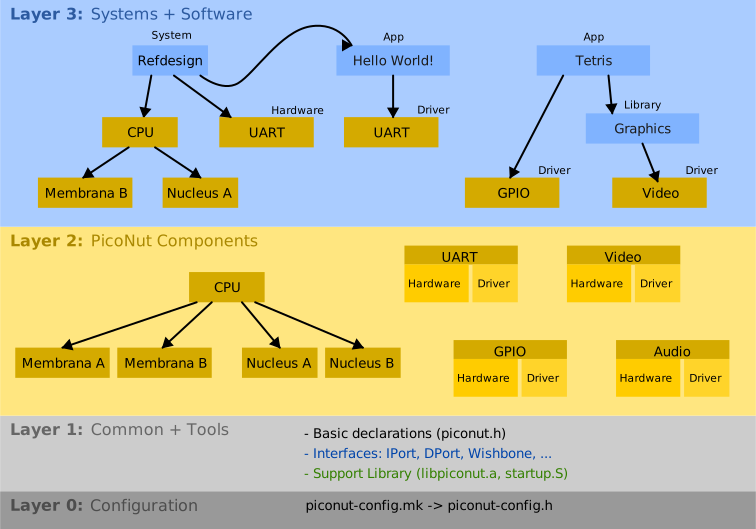
Fig. 74 The PicoNut layer model
The following subsection describe the layers informally.
Specific information on rules and Makefile considerations are given in the section on writing Makefiles.
Layers
Layer 0: Configuration
This layer comprises all auto-generated headers containing configuration parameter definitions. The configuration is updated automatically by means of make targets from layer 1. Normal modules (layer 2 and 3) do not need to take care of it.
Note: The outputs contain variables to identify the version. Whenever the version changes, make config-update should be executed.
Layer 1: Common + Tools
These are header files or elementary software libraries commonly used in any other modules. Common modules ensure that all build tools (from tools) are available and that #include <piconut.h> works properly.
Common code is located inside hw/common, sw/common and
tools of the PicoNut source tree.
Layer 2: PicoNut Components
This layer comprises all regular components, typically hardware modules together with their software drivers. This includes:
hw/cpu(the CPU with all Nucleus and Membrana variants)hw/peripherals(hardware models + software drivers)GUI or other simulator components
Layer 3: Systems and Software
Modules at this layer may be:
Systems
Software: libraries, applications, operating systems
Both systems and software applications may also be external, i.e. not part of the PicoNut source tree.
In general, layer-3 modules (systems or software) never access other components directly through the source tree or by targets in their Makefiles. Instead, they use PicoNut modules via a global installation ($PICONUT) or a system-specific installation maintained inside $(PN_SYSTEM_DIR)/piconut.
Dependency Rules
Dependencies are allowed as specified by the following rules:
A module may depend on its own submodules. The build system ensures that submodules are staged before the module itself is built.
A module may depend on any modules of any lower layer. The build ensures that modules of layers 0 through 2 are prebuilt and staged before the module’s submodules and the module itself are built. The section on writing Makefiles details on how to specify such dependencies for a module.
Systems, software libraries and software applications located in layer 3 may depend arbitrarily on software libraries or applications. The developer of a new or changed module is responsible for maintaining the buildability of the whole project for all possible configurations. In particular, circular dependencies must be avoided. In general, dependencies between software modules should be kept minimal. In the future, a dedicated layer concept for the software infrastructure may be defined.
Besides the cases mentioned so far, a module must not depend on any other modules.
Sub-targets for a certain technology (
TECHS) must not depend on sub-targets for other technologies - neither of the same module nor of any (legally) dependent module. In particular, synthesis techs require certain, sometimes complex (vendor-specific) tools. This rule is to avoid dependencies on such tool suites if a user does not really want to use it.Software modules of layer 3 are not allowed to use hardware-specific configuration variables (
PN_CFG_*, layer 0). Instead, such software must be portable. Any hardware-specific software must be encapsulated in a driver (layer 2) or a common module (layer 1).
Examples
(Hardware) Components like CPU components or peripheral hardware including their software drivers are assigned to layer 2. They may use anything from
hw/commonorsw/common(layer 1).Systems (layer 3) may use any hardware components of layer 2. Their software may be part of the system itself, but may also be a standard application located in
sw/applications. Hence, the system may depend on software libraries and applications.Software projects (layer 3) may use a smaller or larger set of software libraries. Hence, irregular dependencies are allowed for hardware-independent software.
For common modules (layer 0) special rules apply. They comprise only a small part of the code base, and their build times and memory footprints should be kept minimal. Developer working on such modules should carefully inform themselves about the rules that apply. Also, they should be aware that even small changes may quickly break the whole build system.
Directories
The build system operates on clearly defined directory structures and trees as defined in the following subsections.
The Source Tree (PN_SOURCE_DIR)
This is the directory tree obtained after cloning the PicoNut repository, and it contains all source files.
The source tree is to be considered read-only, in particular, no build artefacts are allowed to be written to it. Exceptions must have a good reason and must be documented. In general, writing into the source tree is considered to be a bug.
The subdirectory names build and pub are reserved, since users may want to use $(PN_SOURCE_DIR)/build as the build tree, and $(PN_SOURCE_DIR)/pub may be used as a stage directory in the future.
Note: The presence of a source tree is optional. In particular, externally built systems may use an installation directory instead.
The Build Tree (PN_BUILD_DIR)
The build tree contains all files (final or temporary) generated during the build process.
For each module, the build system assigns a unique, module-specific subdirectory to the module by means of the variable PN_MODULE_BUILD_DIR. Any outputs must be directed to PN_MODULE_BUILD_DIR or a module-specific subdirectory.
A module can use its build directory freely and, for example, create and use subdirectories as adequate. The only restriction to this is that the subdirectories must not have the same name as eventual submodules.
If the module has submodules, the build directory of each submodule will be a $(PN_MODULE_BUILD_DIR)/<submodule name>. This may be used by the main module, e.g. to access header files or object files of a submodule directly without the necessity to export these files globally.
The module build directory is specific to a certain context (e.g. system or global, see below). Hence, builds for different systems with potentially different configurations do not interfere with each other.
The Installation Tree (PN_INSTALLED_DIR)
The installation directory is the place where pre-compiled libraries or pre-synthesized modules together with the exported header files are placed.
Purpose of a PicoNut installation is to allow building systems without having a PicoNut source tree available (external builds). In addition, builds of internal systems can be accelerated with the help of an installation.
Note: The existence of an installation directory is optional.
The location is given by the user by the environment variable PICONUT. Inside the build system, the installation directory must be accessed by the variable PN_INSTALLED_DIR, which is a normalized absolute path to the same directory. If no installation exists, PN_INSTALLED_DIR is an empty string.
Recommended locations are:
PICONUT = ~/.piconutfor a user-specific installationPICONUT = /opt/piconutfor a computer-wide installation
The System Directory (PN_SYSTEM_DIR)
This is the root of a system project using PicoNut. It must contain the following files:
Makefile: A PicoNut-compliant Makfile for the whole system.piconut-config.mk: System-specific configuration
In addition, it may contain the directory
piconut/: System-local installation, destination for output artefacts.
If present, installed files are first looked up there, then $(PN_INSTALLED_DIR).
If a system is defined, make install automatically creates and installs into the system’s piconut/ directory unless an explicit destination is given by a PREFIX parameter.
The Stage Tree (PN_STAGE_DIR)
The stage tree is a directory inside the build tree with the same structure as an installation tree, which is used to collect all exported outputs during a recursive multi-module build process.
All install-* targets defined in module-specific Makefiles write into the stage tree. Only the main install target actually writes into a real installation directory. And it does so by updating the stage tree and then copying it to the installation destination, which is
PREFIXifPREFIXis defined,$(PN_SYSTEM_DIR)/piconutif a system is defined,~/.piconutotherwise.
For global builds (without a system context), the stage directory is contained in the build tree ($(PN_BUILD_DIR/pub). For system context, the stage directory is (PN_SYSTEM_DIR)/piconut.
Directory Layouts
Source Tree (PN_SOURCE_DIR)
doc/: Documentation (manual and technical reports)hw/: Hardware modules and their driverscommon/: Common modules and interface declarationsgui/: GUI for soft hardwarecpu/: CPU and its componentsnucleus/: Nucleus variantsnucleus_ref/: Reference Nucleus implementation…
membrana/: Membrana variantsmembrana_ref/: Reference Membrana implementation…
cpu_peripherals/: CPU-related peripheralsdebugger/: Debugging componentsdebugger_soft/: Debugging components (as soft hardware)clint/: Core-local interrupts (CLINT) moduletimer/: Timer…
peripherals: General peripherals and their driversuart/: UARTgpio/: General-purpose I/O interface (= template for new modules)audio/: Audio interfacevideo/: Video interface…
sw/: Software modulescommon/: Common modules and interface declarations, PicoNut support library (libpiconut)apps/: Applicationshello_piconut: Small demo program, prints “PicoNut” in big lettersverification/: Test applicationsriscof/: Script to apply the RISC-V Compatibility Framework…
benchmarks/: Performance benchmarks…
lib/: Librariesuzlib: Port of the decompression library…
os/: Operating systems and environmentsbootloader: Bootloader for large programs over UARTfreertos: FreeRTOSzephyr: Zephyrlinux: Linux…
systems/: Systemsrefdesign/: Reference demo system & template for new projectstest_<module>: System to test a given module…
tools: Tools for PicoNut developmentboards: Board support filesbuild: (reserved for an optional in-tree build directory)pub: (reserved for an optional in-tree stage directory)
Installation Tree (PN_INSTALLED_DIR)
VERSION: Version stringsw/: Software (RISC-V)include/: RISC-V headers (.h)lib/: RISC-V libraries (.a)bin/: RISC-V binaries (.rv32)
hw/: Hardware artefactsinclude/: SystemC headers (.h) for hardware moduleslib/: Hardware simulation libraries (.a)syn/: Hardware synthesis artefacts<module>.v: Verilog RTL module<module>.<board>.v: Verilog netlist (board-specific)<module>.<board>.dcp: Xilinx design checkpoint (board-specific)…
bin/: Toolsetc/: Tools (configuration files)share/: Tools (supplemental files)boards/: Board support files
System Directory (PN_SYSTEM_DIR)
The system directory is usually part of a larger system and generally managed by the system developers. Only the following file and directory are reserved for PicoNut:
piconut-config-mk: System-specific configurationspiconut: Local installation (optional); UnlessPREFIXis set otherwise,make installinstalls into this directory to accelerate the build process and make the build results (e.g. system simulators, software, FPGA programming files) available at a defined place.
Using the Build System
Overview
Each module directory contains a Makefile capable of building, verifying and installing the module and its submodules (if defined). They may also implement additional, module-specific targets.
A summary of common targets and command-line variables can be viewed by running
$ make help
in the module source directory.
Prerequisites
The build system requires GNU Make 4.4 or later.
Environment and Command Line Variables
The following variables can arbitrarily be set as an environment variable or at the command line when invoking make. Here, they are ordered by their typical and recommended use and place of definition.
Environment variables:
PICONUT: Root of a PicoNut installation (optional).PICONUT_BUILD: PicoNut build directory. (Default: /var/tmp/piconut-build)PICONUT_BOARD: FPGA board or IC technology for synthesis targets (optional).RISCV: Installation directory the RISC-V GCC toolchain (optional)RISCV_SPECS: GCC specs (optional)RISCV_LIBC: GCC libc (optional)ICSC_HOME: Installation directory of ICSC (optional, required for synthesis)
Command line variables:
DEBUG: 1 = Build without optimizations, 0 = Build release variant. (Default: 0)VERBOSE: 1 = Show full commands during build, 0 = Short output. (Default: 0)PREFIX: Destination directory for installations (*install *target)TECHS: Basic technologies to build for, given by a colon-separated list. Example:TECHS=sim:syn. Possible values:sim: Simulation (requires GCC, SystemC)syn``: Synthesis (requires ICSC and typically Yosys; technology is defined byPICONUT_BOARD) (Default =sim`)
MODULES: (Only available in the top-level Makefile) Subset of modules to be built, given by a colon-separated list of paths. Example:MODULES=hw/cpu:hw/uart:sw/apps/hello_piconut(Default: all modules for a standard installation)
When is it Necessary to Clean?
The built system automatically detects changes in pure source code files and rebuilts parts as necessary. However, the following changes generally require a manual cleanup (make clean) of the relevant module(s):
changes in an imported module
changes in the Makefile, including new or removed source files
changes in other meta files
changes in configuration or build parameters (exception:
PN_CFG_*)changes in command line parameters (e.g.
DEBUG) of the make invocation
Writing Makefiles
This section describes the general structure of a module Makefile, variables, rules and targets provided by the build system and the targets that may or must be defined by the Makefile.
Starting Point for New Modules
In many cases, an existing Makefile can just be reused and adapted for a new module. The following modules can be used as templates to start with:
hw/peripherals/uartfor a peripheral modulehw/cpufor a hardware module with submoduleshw/cpu/membrana/membrana_hwfor a hardware module with parts written in Verilogsw/apps/hello_piconutfor a software module
General Structure of a Makefile
Each Makefile has the following general structure:
<PicoNut header>

# Rules for tech A (e.g. simulation) ...
...
<compile, link, archive or synthesis rules>

# Rules for tech B (e.g. synthesis, optional) ...
...
<compile, link, archive or synthesis rules>

# Rules for software A (optional) ...
...
<compile, link, archive or synthesis rules>

# Global targets ...
<global targets>
The following subsections give details on the parts mentioned above.
Build Configuration
Refers to: <PicoNut header>
The header section
may set some variables that define general properties of the module (the pre-configuration),
then includes the PicoNut build system,
then sets some general variables and rules affecting the build system in general (the post-configuration)
In the pre-configuration section (1.), the following optional variables may be set:
PN_SUBMODULES: List of relative paths to submodules. These will be built by the build system before their respective parent modules. Submodules are contained in subdirectories of the module. However, not every subdirectory must represent a submodule. (Default: no submodules)PN_BUILD_COMMON: Build the common and config part first. This defaults to 1, which is adequate for all layer-2 modules as well as internal systems and software of layer 3. Common modules must set it to 0. External modules should set it to 0 to not depend on the PicoNut source tree. (Default: 1)PN_BUILD_INIT: Build initializer / Root module. If set, force the build process to prebuilt the config and common layer modules. Usually, these base modules are built automatically on the primary invocation ofmake, which is adequate in most cases. Only if this mechanism fails, this variable may be set. (Default: 1 for the PicoNut source tree root or the current system’s root, else 0)PN_BUILD_HW: If set (= 1), automatic rules for building hardware are activated. (Default: 1)PN_BUILD_SW: If set (= 1), automatic rules for building software are activated. (Default: 1)PN_BOARD_CONSTRAINTS: A custom constraints file for the board in use. (Default is defined by board configuration, seePICONUT_BOARD)
By default, C++ source files (.cpp) are assumed to by hardware (SystemC) code, and C sources are treated as software (for RISC-V). Software modules using C++ may set PN_BUILD_HW = 0 to clarify that C++ sources are not meant to be build for the host system.
Inclusion of the PicoNut build system (2.) happens with a single line like:
include ../../piconut.mk (relative path to piconut.mk in the source root directory)
for internal modules. External modules not part of the PicoNut repository include the file by:
include $(PICONUT)/piconut.mk
where PICONUT is an environment variable pointing to the PicoNut installation.
In the post-configuration section (3.), the automatic build-prepare: target may be supplied with additional dependencies or a recipe to be executed before the build process starts. This is used to declare dependencies on modules at lower layers.
Also, any user-specific variables may be set in the post-configuration section.
Layer-Specific Options
Layer 0: Configuration
This layer comprises all auto-generated headers containing configuration parameter definitions. The configuration is updated automatically by means of make targets from layer 1. Normal modules (layer 2 and 3) do not need to take care of it.
Outputs:
(hw|sw)/include/piconut-config.h
Depends on (as available):
$(PN_SOURCE_DIR)/piconut-config.mk$(PN_INSTALLED_DIR)/piconut-config.mk$(PN_SYSTEM_DIR)/piconut-config.mk
Note: The outputs contain variables to identify the version. Whenever the version changes, make config-update should be executed.
Layer 1: Common + Tools
These are header files or basic software libraries commonly used in other modules. Common modules ensure that all build tools (from tools) are available outside and that #include <piconut.h> works properly.
Common code must be located inside
hw/common,sw/common, andtools,
respectively. For common code, the following rules apply:
#include <piconut.h>is not allowed. Instead,#include "<piconut_base.h>may be used to have the basic subset of definitions and the configuration variables available.It is strongly discouraged to use configuration variables to avoid frequent rebuilds.
The pre-configuration section of the Makefile must contain:
PN_BUILD_COMMON := 0
The post-configuration must contain the rule
build-prepare: prepare-config
to ensure that layer 0 is up-to-date in the current build tree.
Layer 2: Regular Components
This layer comprises all regular components, typically hardware modules together with their software drivers. This includes:
hw/cpu(the CPU with all Nucleus and Membrana variants)hw/peripherals(hardware models + software drivers)GUI or other simulator components
For a layer-2 module (PicoNut component), nothing particular needs to be added to the Makefile. The build system by defaults assumes the module to be in layer 2 and by default sets PN_BUILD_COMMON := 1 and internally activates the rule:
build-prepare: prepare-common
Note: To avoid that the common parts are built multiple times during recursive make invocations (i.e. for submodules), the build system builds the common layer only in the top-most recursion layer. If this does not work properly, for example, if the PicoNut build system is invoked as a recursive build from a third-party Makefile, the option PN_BUILD_INIT=1 may be added to the command line. This will enforce the (re-)building of layer 1 whenever the current module is built.
Layer 3: Systems and Software
Systems
- may have own configuration,
- have their own tree inside `PN_BUILD_DIR`,
- target 'stage' installs into the system directory by default.
Software (libraries, applications, operating systems)
- must not depend on a system,
- may use drivers from layer 2 (components),
- must not access configuration variables (may be accessed by driver functions),
- may have irregular dependencies on other libraries (or apps): these may be expressed by make rules.
Both systems and software applications may also be external, i.e. not part of the PicoNut source tree.
In general, layer-3 modules (systems or software) never access other components directly through the source tree. Other modules are accessed either in the stage directory or an installation.
a) Using a PicoNut Installation
If
a PicoNut installation exists and
no non-default compile-time options are selected,
the system can be built using an installation without any access to a source tree.
This is typically the case if a system or software is developed externally and not part of the PicoNut repository. The developer only uses PicoNut.
In this case, no rule needs be added to the Makefile, but the developer is responsible for providing a PicoNut installation.
b) Prebuiling Modules
If
no PicoNut installation exists or
non-default compile-time options are set,
some or all of the used modules must be (re-)built before the current layer-3 module can be built.
To this end, the following rule must be added to the respective system Makefile:
build-prepare:
    $(PN_PREBUILD) MODULES=<required modules>
If no installation exists, all modules used by the system or software must be added to the MODULES argument.
If a system is defined, the prebuilt artefacts are then written to a respective sub-directory of the system build tree.
Note: The user is responsible for carefully selecting all components used by the system and affected by a custom configuration. Missing out modules may lead to hard to detect problems.
Automatic Recipes for Compilation and Linking
Refers to: <compile, link, archive or synthesis rules>
For Hardware (Simulation)
For compiling hardware source files written in C++/SystemC, the following automatic rule with a recipe is provided by the build system:
$(PN_MODULE_BUILD_DIR)/sim/%.o: %.cpp
Input files (C++) are detected by their suffix (.cpp). Outputs are automatically written into $(PN_MODULE_BUILD_DIR)/sim.
For linking hardware object files to an executable, automatic recipes are defined for the following suffixes:
Testbench executable:
$(PN_MODULE_BUILD_DIR)/sim/%_tbSimulator:
$(PN_MODULE_BUILD_DIR)/sim/%_sim
To activate these recipes, a rule declaring the underlying object files must be declared, for example:
$(PN_MODULE_BUILD_DIR)/sim/mymodule_tb: $(MODULE_OBJ)
Similarly, for building an archive (library), an automatic recipe exists for the following name template:
Archive:
$(PN_MODULE_BUILD_DIR)/sim/%.a
Example rule:
$(PN_MODULE_BUILD_DIR)/sim/libmymodule.a: $(MYLIB_OBJ)
The list of object files (MYMODULE_OBJ or MYLIB_OBJ in the example) for both cases can be obtained from the list of source files by an assignment like:
MYMODULE_OBJ := $(MYMODULE_SRC:%.cpp=$(PN_MODULE_BUILD_DIR)/sim/%.o)
Build dependencies are maintained automatically in .d files that must be included by a line like:
-include $(MYMODULE_OBJ:%.o=%.d)
-include $(MYLIB_OBJ:%.o=%.d)
Custom flags for compilation or linking can be added by:
PN_HW_CFLAGS += <user compiler flags>
PN_HW_LDFLAGS += <user linker flags>
In general, all search paths are set by the build system, and the same holds for optimization options (based on the global DEBUG parameter). Hence, custom flags should be avoided. However, used libraries must always be declared explicitly by extending PN_HW_LDFLAGS.
Note: All libraries used by the a module - including those generated by submodules - must be declared explicitly by extending PN_HW_LDFLAGS. For example (in module hw/cpu):
PN_HW_LDFLAGS += -lnucleus_ref -lmembrana_soft
For Hardware (Synthesis)
Targets and variables to control synthesis are described in a dedicated section on synthesis.
For Software (RISC-V Cross-Compilation)
For compiling software (RISC-V) source files, the following automatic rules are provided by the build system:
C: ``$(PN_MODULE_BUILD_DIR)/%.o: %.c`
Assembler:
$(PN_MODULE_BUILD_DIR)/%.o: %.S
Input files are detected by their suffix. Outputs are automatically written into $(PN_MODULE_BUILD_DIR).
For linking object files to an executable, an automatic recipe is defined for the .rv32 suffix:
RISC-V executable:
$(PN_MODULE_BUILD_DIR)/%.rv32
To activate the recipe, a rule declaring the underlying object files must be declared, for example:
$(PN_MODULE_BUILD_DIR)/myapp.rv32: $(MYAPP_OBJ)
Similarly, for building an archive (library), an automatic recipe exists for the following name template:
Archive:
$(PN_MODULE_BUILD_DIR)/%.a
Example:
$(PN_MODULE_BUILD_DIR)/libmyapp.a: $(MYLIB_OBJ)
The list of all object files (for linking/archiving) can be obtained from the list of source files by an assignment like:
MYAPP_OBJ := $(MYAPP_SRC:%.cpp=$(PN_MODULE_BUILD_DIR)/%.o)
Build dependencies are maintained automatically in .d files that must be included by a line like:
-include $(MYAPP_OBJ:%.o=%.d)
-include $(MYLIB_OBJ:%.o=%.d)
Custom flags for compilation or linking can be added by:
PN_SW_CFLAGS += <user compiler flags>
PN_SW_LDFLAGS += <user linker flags>
In general, all search paths are set by the build system, and the same holds for optimization options (based on the global DEBUG parameter). Hence, custom flags should be avoided. However, used libraries must always be declared explicitly by extending PN_SW_LDFLAGS.
Note: All libraries used by the a module - including those generated by submodules - must be declared explicitly by extending PN_SW_LDFLAGS.
Search Order
The automatic recipes make sure that header files, libraries and synthesis artefacts are searched for in the following location in this order of precedence:
$(PN_STAGE_DIR)$(PN_SYSTEM_DIR)$(PN_INSTALLED_DIR)
Inside each of these locations, the following sub-paths are used:
hw/include: headers for hardware moduleshw/lib: libraries for hardware simulationhw/syn: synthesis artefacts for hardware modulessw/include: headers for software (RISC-V) modulessw/lib: libraries for software (RISC-V) modulessw/bin: software binaries (RISC-V)
Global Module Targets
Refers to: <global targets>
The following targets may be provided by the module Makefile. They will be picked up and used by the main targets build, stage, verify and install, which are defined and implemented in the build system.
Unless specified otherwise, the targets are optional. If missing, they do not produce any outputs.
build-sim: Build all artefacts for simulation, typically the library and testbench executable.build-syn: Build all synthesis artefacts.build-all: Build everything which is not dependent on a certain TECHS argument, e.g. RISC-V software.
build-prepare: Phony target as a hook for any sort of build preparations. All its dependencies and an eventually defined recipe are resolved before any of the modules’sbuild-submodulesandbuild-<tech>targets are invoked. This is used for prebuilding PicoNut modules in systems. By default, an implicit rulebuild-prepare: prepare-commonis active, which is suitable for a layer-2 module. To disable the rule, setPN_BUILD_COMMON := 0in the pre-configuration section of the Makefile.
verify-all/verify-sim/verify-syn: Verify the outputs of the respectivebuild-*target.
install-sim: Stage all simulation artefacts.install-syn: Stage all synthesis artefacts.install-all: Stage everything which does not depend on a certainTECHSargument. In the case of hardware, header files should be installed here.
Installation Macros
Inside the install-* recipes (see previous section), the following commands must be used. It is not allowed to write into the target directory in another way. They make sure that the files are installed into the right directory with the correct permissions:
$(PN_INSTALL_HW_INCLUDE) <file(s)>: Install hardware header(s)$(PN_INSTALL_HW_LIB) <file(s)>: Install hardware simulation library/libraries$(PN_INSTALL_HW_BIN) <file(s)>: Install a simulator$(PN_INSTALL_HW_SYN) <file(s)>: Install a synthesis artefact
$(PN_INSTALL_SW_INCLUDE) <file(s)>: Install software headers$(PN_INSTALL_SW_LIB) <file(s)>: Install a software library/libraries$(PN_INSTALL_SW_BIN) <file(s)>: Install a software binary
$(PN_INSTALL_TOOL_BIN) <file(s)>: Install a tool (fromtools/*only)$(PN_INSTALL_TOOL_LIB) <file(s)>: Install a tool library (fromtools/*only)
How the Build System Works
The build system implements the following global targets:
buildverifystageinstall
When invoked, the following steps are performed:
Build and stage the common and config layers (if adequate, depending on the module layer).
Recursively call the same target for all submodules.
Call the target
build-all/verify-all/install-allof the present module.These targets in turn depend on the tech-specific targets
build-(sim|sym)etc., which are defined by the module Makefile.
Note: Despite their names, the targets install-(all|sim|syn) are actually activated by the global stage target and are supposed to write into the stage directory. The PN_INSTALL_* macros do this correctly. This naming has been selected to be compatible with the conventions in other build systems. On the other hand, the global install performs a real installation by calling stage and then copying the stage directory to the installation destination (PREFIX).
Variables
This section summarize read-only variables for use in Makefiles. These variables are also exported to the environment of any recipe commands and can be used there.
Directories
PN_SOURCE_DIR: PicoNut source tree (optional). This is the root directory of the PicoNut source tree to be used. It is set automatically to the location of thepiconut.mkfile.PN_MODULE_SOURCE_DIR: Source directory for the current module. For internal modules, this is a subdirectory of PN_SOURCE_DIR.
PN_SYSTEM_DIR: System directory (optional). This is the root directory of a system project.
PN_BUILD_DIR: Global build directory.PN_MODULE_BUILD_DIR: Build directory for the current module. All build artefacts for the present module must go here and nowhere else.PN_SYSTEM_BUILD_DIR: Build tree for the current system (optional). If a system context is defined, all module build directories are a subdirectory of this.
PN_INSTALLED_DIR: Location an existing installation tree (optional). This is derived from the (environment) variablePICONUT.
PN_STAGE_DIR: The stage directory.
PN_TOOLS_DIR: Depending on the build status (layer) and existence of a source or installation tree, this points to a directory in which the PicoNut tools are available. In layers 0 and 1, only those tools are guaranteed to be available that do not need to be compiled. Scripts can alway be assumed to be available.PN_TOOLS_BIN: Equal to$(PN_TOOLS_DIR)/bin.PN_TOOLS_ETC: Equal to$(PN_TOOLS_DIR)/etc.PN_BOARD_DIR: Board definition.
Module Description
PN_MODULE_ID: The unique module ID. The identifier of the current module. For a module contained in the PicoNut source tree, this is the relative path to the module. For an external module, the ID is set toPN_MODULE_SOURCE_DIRwith a leading ‘/’ removed, which is basically the absolute path.PN_MODULE_NAME: Name of the module (= ID without path). For hardware modules, it is required that the top-level module and the main source file are named likePN_MODULE_NAME. For software modules, it is recommended that the main source file, an eventual library and an eventual main class are named likePN_MODULE_NAME.
System Description
PN_SYSTEM_ID: The unique identifier of the system context. For a system contained in the PicoNut source tree, this is the relative path to the system. For an external sytem,PN_SYSTEM_IDis set toPN_SYSTEM_DIRwith a leading ‘/’ removed, which is basically the absolute path of the system.PN_SYSTEM_NAME: Name of the system (= ID without path).
If no system environment is defined, all these variables are empty or undefined. To reliably check if a system is defined, check whether PN_SYSTEM_DIR is undefined.
Tool chains
Tools for hardware simulation:
PN_HW_CC: C Compiler (gcc)PN_HW_CXX: C++ Compiler (g++)PN_HW_AS: Assembler (as)PN_HW_CPP: C Preprocessor (cpp)PN_HW_LD: Linker (g++)PN_HW_AR: Archive tool (ar)PN_HW_OBJDUMP: Object Dump (objdump)PN_HW_GDB: Debugger (gdb)
In brackets, the respective tool of the GNU toolchain is shown.
Tools for software (RISC-V cross toolchain):
PN_SW_CROSS: Prefix of the cross toolchainPN_SW_CC: C Compiler (gcc)PN_SW_CXX: C++ Compiler (g++)PN_SW_AS: Assembler (as)PN_SW_CPP: C Preprocessor (cpp)PN_SW_LD: Linker (g++)PN_SW_AR: Archive tool (ar)PN_SW_OBJDUMP: Object Dump (objdump)PN_SW_GDB: Debugger (gdb)
In brackets, the respective tool of the GNU toolchain is shown.
Configuration Parameters
Configuration parameters are set at compile-time and generally specify how modules or systems are built - e.g. which Nucleus or Membrana variant(s) are used or which memory layout is used for memories and peripherals.
General Considerations
All configuration parameters are prexixed by PN_CFG_ followed by the module name or a commonly agreed groups, for example:
PN_<name>_: Parameter specific to module<name>.PN_CFG_CPU_: Parameters related to a PicoNut corePN_CFG_SYS_: System parameters (e.g. memory layout, system clock frequency)
Configuration parameters can be defined in a piconut-config.mk file or in C header files. In the former case, they are visible and readable in Makefiles and in C/C++ source files. In the latter case, they can only be read in the source code of the respective language, but the user can set their value in a piconut-config.mk file at system-level.
Changing configuration parameters requires the recompilation of all modules using the respective parameters. To avoid the necessity of recompilation, simulation-time or synthesis-time parameters are preferred over compile-time (PN_CFG_*) parameters. Synthesis-time parameters can be implemented by adding an init(...) function to SystemC modules which is called during the SystemC elaboration phase and configures the module appropriately.
In detail, the following considerations hold for the PicoNut configuration system:
All configuration parameters should be visible in hardware and software.
A configuration parameter always relates to
a) a module (identified by its relative directory path)
b) a group of modules, e.g. all Nuclei or all Membranas (-> identified by their common containing directory, e.g.
hw/cpus/nuclei)c) a system (e.g. memory layout, clock frequency)
Configuration parameters are typically set in (just) three places:
a) inside the respective module itself (= default for common use)
b) in the build system (= default for common use)
c) inside the system for system-secific settings
Configuration parameters mainly control the hardware. Software may just want to read them, mainly for compile-time optimizations or variations.
As far as possible, hardware parameters should remain variable at runtime (simulation) or synthesis time (synthesis).
As far as possible, hardware parameters should be accessible to software at runtime, e.g. by means of CSRs (CPU) or version/feature registers (peripherals).
Rules and conventions
a) Module-Level
Module-related configuration parameters are defined and documented in the respective module sources, typically inside C/C++ header files (.h). The documentation should be done via Doxygen as a section “Configuration Options” inside the module documentation.
All configuration variables must adhere to the naming conventions (see section on naming conventions, i.e. start with
PN_CFG_).All definitions inside the module must allow them to be predefined by enclosing them with
#ifndef PN_CFG_...and#endif.Before using any configuration file in C/C++ code, the PicoNut header file must be included:
#include <piconut.h>
Notes:
The way to define module-specific parameters ist not language-independent. In the future, this may be overcome by introducing an optional, per-module
piconut-config.mkfile.
b) Global configuration
Configuration parameters not related to a particular module (typically system-level parameters) are defined and documented with the build system in the file
$PN_SOURCE_DIR/piconut-config.mk.A global or system-specific C header file containing all parameters set at installation time is auto-generated and included by
#include <piconut.h>from any hardware or software source file.Header/package files for other languages (e.g. VHDL) may follow in the future. They will also be auto-generated from
$PN_SOURCE_DIR/piconut-config.mk.
c) System configuration
Any configuration parameter may also be set/modified in a system project using the file
PN_SYSTEM_DIR/piconut-config.mk. A standard makefile rule for systems will generate a C/C++ header insidepiconut/.The system makefile is responsible for (re-)building any PicoNut modules with system-specific parameters that do not match the global defaults. Such modules must be built and installed as follows:
$ make build PN_SYSTEM=<my system>$ make install PN_SYSTEM=<my system> PREFIX=<my system>/piconut
Synthesis
Hardware synthesis is inherently more complex then software compilation. The actual steps depend on the target technology and tool chain. Design hierarchies may be flattened at arbitrary phases, and partial results may be stored for later re-use in different formats. The following subsections explain how the build system works to accommodate all these aspects.
Synthesis Phases
Independent of the target technolgy and toolchain, synthesis is split up into three distinct phases with defined outputs:
SystemC synthesis: C++/SystemC code is translated into Verilog RTL code.
Netlist synthesis: RTL code in Verilog or VHDL is synthesized into an optimized, flattened gate-level netlist (board-specific).
Layout generation: The flattened gate-level netlist is transformed into a layout (ASIC) or programming file (aka “bit file”, FPGA).
Terminology
A hollow model contains a model (e.g. at RT or gate level) of the current module without any submodules.
A solid model contains a model (e.g. at RT or gate level) of the current module including all submodules (recursively, if necessary).
A blackbox is a sub-module explicitly left out, even if the model is solid. Typical examples are embedded memories that may be provided later with initialized content.
Modules written in SystemC can be defined in two different ways:
A co-synthesized module is typically processed by ICSC together with its super-module, and no pre-synthesized artefacts are installed before.
A pre-synthesized module is a hardware module written in a way that it can be synthesized on its own and is not included during SystemC synthesis of an upper-level module.
Modelling Modules
Simple SystemC Module (Co-Synthesized)
A co-synthesized module is not reused in presynthesized way. Instead, its C++/SystemC files are always collected and synthesized together with its super-module.
The C++ code does not require any special treatment. It is strongly recommended to write an ICSC-compatible testbench anyway and test synthesis in the verify-syn target.
During synthesis, the C/C++ preprocessor variable __SYNTHESIS__ is defined. It is recommended to exclude all code not required for synthesis by #ifndef __SYNTHESIS__ directives.
Recommended Makefile rules are:
build-syn: (nothing)

verify-syn: build-netlist
  # (run the testbench)

install-all:
  # (install headers, which are the same for simulation and synthesis)
Pre-synthesized SystemC Module
A pre-synthesized module is reusable in pre-synthesized way to speed up system synthesis.
To make a module pre-synthesized, the main header file needs to be prepared specifically as follows. Example code can be found in the modules nucleus_ref (CPU component) and uart (peripheral).
The main header ($(PN_MODULE_NAME).h) must be reduced to an
empty module with the correct interface, if
PN_PRESYNTHESIZED_H_ONLY(<module>)
delivers “true” as a preprocessor condition, where <module> is $(PN_MODULE_NAME).
In particular, if the above condition is met, the header file
must not contain any references to functions, methods or variable implementations,
should not contain anything else besides the main module declaration (
SC_MODULE) and its port declarations (sc_in,sc_out).may contain empty inline implementations for the constructor and syntactically needed methods (e.g.
pn_trace()). These pseudo-implementations do not need to provide any functionality, they are never executed in simulations.must contain the following line in the
protected:section (but only, ifPN_PRESYNTHESIZED_H_ONLY(...)is true!):PN_PRESYNTHESIZED;
Recommended Makefile rules are:
build-syn: build-netlist

verify-syn: build-netlist
  # (run the testbench)

install-syn: build-syn
  $(PN_INSTALL_HW_SYN) $(PN_SYSTEMC_OUTPUT) $(PN_NETLIST_OUTPUT)

install-all:
  # (install headers, which are the same for simulation and synthesis)
The install-syn recipe installs both the RTL Verilog file ($(PN_SYSTEMC_OUTPUT)) and the gate-level netlist ($(PN_NETLIST_OUTPUT)).
During synthesis, the C/C++ preprocessor variable __SYNTHESIS__ is defined. It is recommended to exclude all code not required for synthesis by #ifndef __SYNTHESIS__ directives.
Non-SystemC Models
RTL models (= module or part of a module) written in Verilog (*.v) or VHDL (*.vhdl) can be integrated by just adding the source files to PN_NETLIST_SRC, thus skipping the process of SystemC synthesis for them.
Blackbox Models
Blackbox models allow to leave a “hole” in the design hierarchy, which is filled by an appropriate model later in the synthesis process. To define a blackbox, a Verilog file containing the just model interface prefixed with the attribute (* blackbox *) needs to be written.
The tool pn-memgen can generate such a model (for embedded memories), which can be used as an example. The application of blackbox models is demomstrated in module membrana_hw and the system refdesign, where an embedded memory inside the Membrana can be filled later during system assembly.
Phase 1: SystemC Synthesis
For SystemC synthesis, the Intel Compiler for SystemC (ICSC) is used. ICSC comes with its own build system and is able to process a complete design tree. However, pre-synthesized sub-modules are not processed, and the generated Verilog code only contains a reference to these a sub-modules, which must later be provided explicitly.
Input:
Set of C++ files using SystemC, including the model and the testbench.
Output:
$(PN_SYSTEMC_OUTPUT): a RTL Verilog (.v) model, solid besides pre-synthesized and explicit blackbox sub-modules
The variable $(PN_SYSTEMC_OUTPUT) is defined by the build system and refers to the name of the Verilog output file.
Makefile:
If the module is pre-synthesized, all source files including the testbench can be defined by the variable PN_SYSTEMC_SRC, for example (MODULE_SRC and TESTBENCH_SRC are user-defined variables and not strictly necessary):
MODULE_SRC := mymodule.cpp morecode.cpp
TESTBENCH_SRC := mymodule_tb.cpp
...
PN_SYSTEMC_SRC := $(MODULE_SRC) $(TESTBENCH_SRC)
If the module is co-synthesized (i.e. synthesized together with its super-module), all source files without the testbench must be exported by a recipe for icsc-sources, whereas (only) the testbench must defined by the variable PN_SYSTEMC_SRC, for example:
PN_SYSTEMC_SRC := $(TESTBENCH_SRC)

icsc-sources:
	echo $(MODULE_SRC)
Sub-modules to be collected by ICSC are defined by setting PN_SYSTEMC_SUBMODULES:
PN_SYSTEMC_SUBMODULES := $(PN_SUBMODULES)
Pre-synthesized modules do not need to be included here.
SystemC synthesis is activated by the following rule:
build-syn: build-systemc
Phase 2: Netlist Generation (RTL Synthesis)
Input:
PN_NETLIST_SRC: Set of synthesizable RTL models (Verilog, VHDL)PN_TOPLEVEL(optional): Entity name of the top-level module (default:m_$(PN_MODULE_NAME))
The variable PN_NETLIST_SRC must be set by the user’s Makefile and is evaluated by the build system.
Note: For all pre-synthesized submodules, Verilog models (RTL or gate-level) must be passed here.
Output:
$(PN_NETLIST_OUTPUT): Technology-dependent gate-level netlist; solid except for explicit blackbox modules for which no implementation has been passed by$(PN_NETLIST_SRC).$(PN_NETLIST_OUTPUT).log: Synthesis report including area and timing (as available).
The variable $(PN_NETLIST_OUTPUT) is defined by the build system and refers to the name of the output file. Its name is $(PN_MODULE_NAME).$(PN_CFG_BOARD).<ext>, where the extension <ext> depends on the board and toolchain.
Makefile:
The Makefile must set PN_NETLIST_SRC as described above.
To get the Make dependencies right, the following rule should be added after the definition of PN_NETLIST_SRC:
# Declare dependencies for the netlist synthesis phase ...
#   Usually, the following line can be left untouched.
$(PN_NETLIST_OUTPUT): $(PN_NETLIST_SRC)
Netlist (gate-level) synthesis is activated by the following rule, which also implies build-systemc:
build-syn: build-netlist
Phase 3: Layout Generation (Place and Route)
Input:
A successful run of phase 2.
PN_BOARD_CONSTRAINTS(optional): A custom constraints file for the board in use (to be set in the pre-configuration).
The variable $(PN_LAYOUT_SRC) is set by the build system and cannot by set manually. It points to the file used for layout generation. It may but does not need to be identical to $(PN_NETLIST_OUTPUT).
Output:
$(PN_LAYOUT_OUTPUT): The final output product, e.g. a.bitfile for FPGA programming (technology-specific).$(PN_LAYOUT_OUTPUT).log: Synthesis report including area and timing.
Makefile:
Layout synthesis (place and route) is activated by the following rule, which also implies build-netlist:
build-syn: build-layout
Further Information
For the case that some information is missing or appears to be outdated, more and up-to-date information can be found in
the sample Makefiles mentioned in the section on writing new Makefiles,
as comments in the file
piconut.mk.