Graphics
Author: Konrad Armbrecht 2025, Martin Erichsen 2025, Beaurel Ingride Ngaleu 2025
Overview
The graphics peripheral c_soft_graphics enables the PicoNut processor to output any graphical content. It enables the PicoNut to run applications that depend on an image output.
Interface Definition
Overview
The Graphics module serves as the display output for the Piconut, an open-source RISC-V processor. This module provides a set of registers that facilitate the control and management of graphics rendering within the system. The Graphics adapter contains several registers, which are described below.
While the implementation of hardware or software graphics does not necessarily require the use of every feature of each register, it is essential that all registers are defined. This ensures that developers have a clear understanding of the available components and their functionalities, providing security and flexibility when developing graphics applications for the Piconut system.
Register offsets
The memory map for the Graphics control registers is shown in the table below. The Graphics memory map has been designed to require only 32-bit memory accesses.
Offset |
Name |
Description |
|---|---|---|
0x000 |
CONTROL |
Can be used to control the graphic interface. |
0x004 |
STATUS |
General status register. |
0x008 |
RESOLUTION_MODE |
Set value to choose respective resolution mode in pixel. |
0x00C |
RESOLUTION_MODE_SUPPORT |
Read only. Stores supported resolution modes as a bitmask. Each bit represents a supported mode (1 = supported, 0 = unsupported). |
0x010 |
COLOR_MODE |
Read only. Set registers bits to choose respective color mode in bits per pixel. |
0x014 |
COLOR_MODE_SUPPORT |
Read only. Stores supported color modes as a bitmask. Each bit represents a supported mode (1 = supported, 0 = unsupported). |
0x018 |
FRAMEBUFFER |
Pointer to framebuffer memory in the piconut system. |
0x01C |
SCANLINE |
Register to identify the current position of image buildup. |
0x100 |
COLOR_MAP |
Range: 0x100 - 0x4ff. 256 registers for color values. |
Detailed register description
Note:
Attr. RW = Read and write
Attr. R = Read only
CONTROL Register
Register offset: 0x000
Can be used to control the graphic interface.
Bit |
Field name |
Attr. |
Description |
|---|---|---|---|
0 |
Interrupt |
RW |
Enable/disable Interrupt |
1 |
Output |
RW |
Enable/disable image output. |
STATUS Register
Register offset: 0x004
General status register for the graphic interface.
Bit |
Field name |
Attr. |
Description |
|---|---|---|---|
0 |
Ready |
R |
Indicates if the graphic interface is ready (0: not ready, 1: ready). |
1 |
Error |
R |
Indicates if there is an error (0: no error, 1: error occurred). |
2 |
Busy |
R |
Indicates if the graphic interface is busy (0: idle, 1: busy). |
RESOLUTION_MODE Register
Register offset: 0x008
Set register bit to choose respective resolution mode in pixel.
Bit |
Field name |
Attr. |
Description |
|---|---|---|---|
0 |
640x480 |
RW |
Resolution mode 640x480 pixel |
1 |
800x600 |
RW |
Resolution mode 800x600 pixel |
2 |
1024x768 |
RW |
Resolution mode 1024x768 pixel |
3 |
1280x720 |
RW |
Resolution mode 1280x720 pixel |
4 |
1920x1080 |
RW |
Resolution mode 1920x1080 pixel |
5 |
3x2 |
RW |
Resolution mode 3x2 pixel |
6 |
80x60 |
RW |
Resolution mode 80x60 pixel |
7 |
320x240 |
RW |
Resolution mode 320x240 pixel |
RESOLUTION_MODE_SUPPORT Register
Register offset: 0x00C
Read only. Stores supported resolution modes as a bitmask. Each bit represents a supported mode (1 = supported, 0 = unsupported).
Before requesting to set a certain resolution mode, check, if it is supported. E.g. if mode 0x10 is requested while only modes 0x0 (640x480) and 0x1 (800x600) are supported, an error will occur.
COLOR_MODE Register
Register offset: 0x010
Set register bit to choose respective color mode. For undefined color modes, it is the implementation’s responsibility to select appropriate entries from the COLOR_MAP.
COLOR_MAP: Address range 0x100 - 0x4FF contains 256 colors, with 4 bytes per entry.
Bit |
Field name |
Attr. |
Description |
|---|---|---|---|
0 |
1 Bit Monochrome |
RW |
Black and White only |
1 |
2-Bit Mapped |
RW |
4 colors from the COLOR_MAP |
2 |
2-Bit Grayscale |
RW |
4 levels of gray from the COLOR_MAP |
3 |
3-Bit Mapped |
RW |
8 colors from the COLOR_MAP |
4 |
3-Bit RGB |
RW |
1 bit per RGB channel: black, red, green, blue, cyan, magenta, yellow and white |
5 |
3-Bit Grayscale |
RW |
8 levels of gray from the COLOR_MAP |
6 |
4-Bit Mapped |
RW |
16 colors from the COLOR_MAP |
7 |
4-Bit RGBI |
RW |
4-bit RGBI is similar to the 3-bit RGB but adds one bit for dark/bright intensity, see CGA-standard |
8 |
4-Bit Grayscale |
RW |
16 levels of gray from the COLOR_MAP |
9 |
8-Bit Mapped |
RW |
All 256 colors from COLOR_MAP |
10 |
8-Bit RGB332 |
RW |
3 bits red, 3 bits green, 2 bits blue |
11 |
8-Bit Grayscale |
RW |
256 levels of gray: RGB(0, 0, 0) to RGB (255, 255 , 255) |
12 |
16-Bit RGB565 |
RW |
RGB565 Color mode with 16 bits per pixel: 5 bits red, 6 bits green, 5 bits blue. |
13 |
32-Bit RGB888 |
RW |
Color mode with 32 bits per pixel, uses 24-bit truecolor (RGB888) packed into a 32-bit format for memory alignment. The upper 8 bits (typically alpha in RGBA) are not being used, as transparency is not relevant in the context of direct image display. |
2-Bit Mapped: https://lospec.com/palette-list/galactic-pizza
Name |
Dark Magenta |
Magenta-rosa |
Yellow |
White |
|---|---|---|---|---|
Binary |
00 |
01 |
10 |
11 |
RGB |
#3A0041 |
#C477A2 |
#F2F18B |
#FFFFFF |
2-Bit Grayscale: https://lospec.com/palette-list/2-bit-grayscale
Name |
Black |
Dark Gray |
Light Gray |
White |
|---|---|---|---|---|
Binary |
00 |
01 |
10 |
11 |
RGB |
#000000 |
#676767 |
#B6B6B6 |
#FFFFFF |
4-Bit Mapped: https://lospec.com/palette-list/go-line
Name |
Dark Purple |
Dark Pink |
Bright Red |
Orange |
Yellow |
Light Green |
Dark Green |
Dark Blue |
Black |
Blue |
Light Blue |
Cyan |
Light Pink |
Grey |
Brown |
Dark Brown |
|---|---|---|---|---|---|---|---|---|---|---|---|---|---|---|---|---|
Binary |
0000 |
0001 |
0010 |
0011 |
0100 |
0101 |
0110 |
0111 |
1000 |
1001 |
1010 |
1011 |
1100 |
1101 |
1110 |
1111 |
RGB |
#430067 |
#94216A |
#FF004D |
#FF8426 |
#FFDD34 |
#50E112 |
#3FA66F |
#365987 |
#000000 |
#0033FF |
#29ADFF |
#00FFCC |
#FFF1E8 |
#C2C3C7 |
#AB5236 |
#5F574F |
COLOR_MODE_SUPPORT Register
Register offset: 0x014
Read only. Stores supported color modes as a bitmask. Each bit represents a supported mode (1 = supported, 0 = unsupported).
Before requesting to set a certain color mode, check, if it is supported. E.g. when trying to set resolution mode 0x10, but only 0x0 (640x480) and 0x1(800x600) is defined, an error will occur.
FRAMEBUFFER Register
Register offset: 0x018
Pointer to framebuffer memory in the piconut system.
SCANLINE Register
Register offset: 0x01C
Read only. Provides the current scanline index being rendered.
COLOR_MAP Register
Register offset: 0x100
Read only. The COLOR_MAP register range (0x100 - 0x4FF) consists of 256 registers for color values. Each entry is a 32-bit value representing a color, with the bits allocated for the RGB color channels. The layout is as follows:
0xUURRGGBB |
Description |
|---|---|
UU |
Unused |
RR |
Red |
GG |
Green |
BB |
Blue |
These registers are optional and depend on the supported color modes of the hardware. They are necessary, when using a mapped color mode. Each entry in the COLOR_MAP is structured as a 32-bit value, where the bits are allocated for the RGB color channels. Specifically, the layout is as follows:
Example use:
Hex (ARGB) |
RGB Decimal |
Color |
|---|---|---|
0x00FF0000 |
(255, 0, 0) |
Red |
0x0000FF00 |
(0, 255, 0) |
Green |
0x000000FF |
(0, 0, 255) |
Blue |
Practical Access
The COLOR_MAP is used by setting the corresponding color index in color modes that map directly to the color table. For example, in a 2-bit color mode, you could access the first four colors with COLOR_MAP[index] as follows:
0 = Black(0x00000000)1 = White(0x00FFFFFF)2 = Red(0x00FF0000)3 = Green(0x0000FF00)
In higher bit modes (e.g., 8-bit), you can access up to 256 colors from the COLOR_MAP. A specific color is referenced by its index, and the respective color value is retrieved from the corresponding COLOR_MAP entry.
Soft Graphics
- group c_soft_graphics
This module is used to simulate the graphics peripheral. The module is implemented as a soft peripheral and can be used in the simulation environment.
- Author
Konrad Armbrecht
The module has a register for storing the output-images, called framebuffer. The framebuffer is set up as a single large array where all output-image lines are stored successively. The size is calculated by width and height given from the constructor. With a 10 × 10 px resolution, you have 100 array elements, and the framebuffer[10] element is the first pixel of the second output-image line. The module has a 32-bit memory interface and can be accessed by the soft peripheral interface.
Note: The module is not synthesizable and is only used for simulation purposes.
Registers
-
struct regs_t
Registers of the c_soft_graphics module.
-
enum c_soft_graphics::e_regs
Register address offsets.
Values:
-
enumerator CONTROL = 0x0
-
enumerator WIDTH = 0x4
-
enumerator HEIGHT = 0x8
-
enumerator RESOLUTION_MODE = 0xC
-
enumerator RESOLUTION_MODE_SUPPORT = 0x10
-
enumerator COLOR_MODE = 0x14
-
enumerator COLOR_MODE_SUPPORT = 0x18
-
enumerator FRAMEBUFFER = 0x1C
-
enumerator CONTROL = 0x0
Functions
-
c_soft_graphics::c_soft_graphics(uint64_t base_address, ResolutionMode resolution_mode, ColorMode color_mode, uint32_t clock_frequency, void (*flush_func)(uint32_t *framebuffer, uint32_t framebuffer_size_in_px), std::function<void(bool)> callback_signal_graphics_interrupt = nullptr)
Constructor.
- Parameters:
base_address – base address of the peripheral in the address space of the simulation
resolution_mode – resolution mode (recommended for performance reasons: “1” -> 60x80 px)
color_mode – color depth in bits per pixel (here only “4” is implemented -> 32 bit)
clock_frequency – maximum value for interrupt counter
flush_func – Callback function to flush the framebuffer to GUI.
callback_signal_graphics_interrupt – Callback function to signal graphics interrupts.
-
c_soft_graphics::~c_soft_graphics()
Destructor.
-
void c_soft_graphics::flush_graphics(void (*flush_to_gui)(uint32_t*, uint32_t), uint32_t framebuffer_size)
Flushes the graphics framebuffer using the provided callback function.
- Parameters:
flush_to_gui – Callback function to send framebuffer data to the GUI.
framebuffer_size – Size of the framebuffer in pixels.
-
void c_soft_graphics::register_meip_callback(std::function<void(bool)> callback)
Register a callback function for graphics interrupt changes.
- Parameters:
callback – The callback function
-
void c_soft_graphics::on_rising_edge_clock() override
Triggers interrupts when max_counter value is reached. This function is automatically called on every rising edge of the clock.
-
void c_soft_graphics::clear_framebuffer()
How to make use of the Graphics module
Create a pointer to the graphics module:
volatile uint32_t* graphics = (uint32_t*)0x40000000;
Read the framebuffer size:
int width = *(graphics + 0x1);
int height = *(graphics + 0x2);
int framebuffersize = width * height;
Now you can write pixel in hex-RGB color format to the framebuffer:
for (int i = 0; i < framebuffersize; i++) {
    *(graphics + 0x7 + i) = 0x00123456;
}
See sw/apps/graphics_fancy_random_squares/graphics_fancy_random_squares.c for more details on that example.
Global config
Graphics-related settings in global config file /hw/piconut/config.mk
CFG_GRAPHICS_BASE_ADDRESS = 0x40000000
Defines the memory address of the graphics peripheral in the simulator address space.
Hardware Graphics
The wb_graphics peripheral offers an interface to external monitors. Currently, output via a VGA compatible interface at an resolution of 640x480 is supported. A wishbone interface gives access to control and status registers, as well as access to the internal framebuffer. Following figure shows the structure of this peripheral. It is designed around a streaming pipeline. Video signals flow unidirectional from source (e.g. internal framebuffer ) to sink modules (e.g. VGA signal generator). Controlled by the line/column counter, it outputs a continuous stream of pixels.

Structure of the wb_graphics peripheral.
Color Modes
This peripheral supports several color modes shown in the table below. The color translator module interprets colors according to this table.
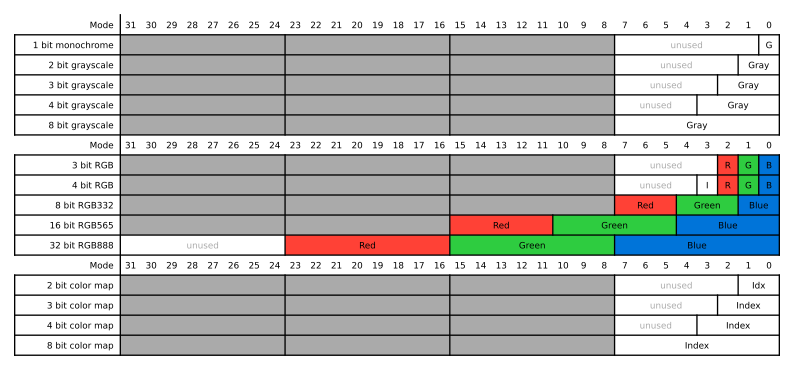
Table of color mode definitions.
The 4 bit RGBI mode is similar to the 3 bit RGB mode, with an additional bit to select between two color intensities. Its 16 colors are shown in the figure below.
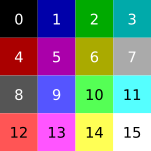
4 bit RGBI color palette
Modules
Framebuffer
Warning
doxygenfunction: Unable to find project ‘m_graphics’ in breathe_projects dictionary
Warning
doxygenfunction: Unable to find project ‘m_graphics’ in breathe_projects dictionary
Color Translator
Warning
doxygenfunction: Unable to find project ‘m_graphics’ in breathe_projects dictionary
VGA Signal Generator
Warning
doxygenfunction: Unable to find project ‘m_graphics’ in breathe_projects dictionary
Warning
doxygenfunction: Unable to find project ‘m_graphics’ in breathe_projects dictionary
VGA Timing Table
Warning
doxygenfunction: Unable to find project ‘m_graphics’ in breathe_projects dictionary
Demo Image Source
Warning
doxygenfunction: Unable to find project ‘m_graphics’ in breathe_projects dictionary
wb_graphics
Warning
doxygenfunction: Unable to find project ‘m_graphics’ in breathe_projects dictionary
wb_slave
Warning
doxygenfunction: Unable to find project ‘m_graphics’ in breathe_projects dictionary